The Box
Turn it off once. For every TV.
The app shows you the switch. The Box makes sure it stays off. It joins your Wi-Fi like any other device, then builds a second network that only your TVs use, and blocks the servers they report to.
No cable to the router. No router password. It works in a building where the only thing you control is your own Wi-Fi.

Scroll
-
One box
Smaller than a coaster.
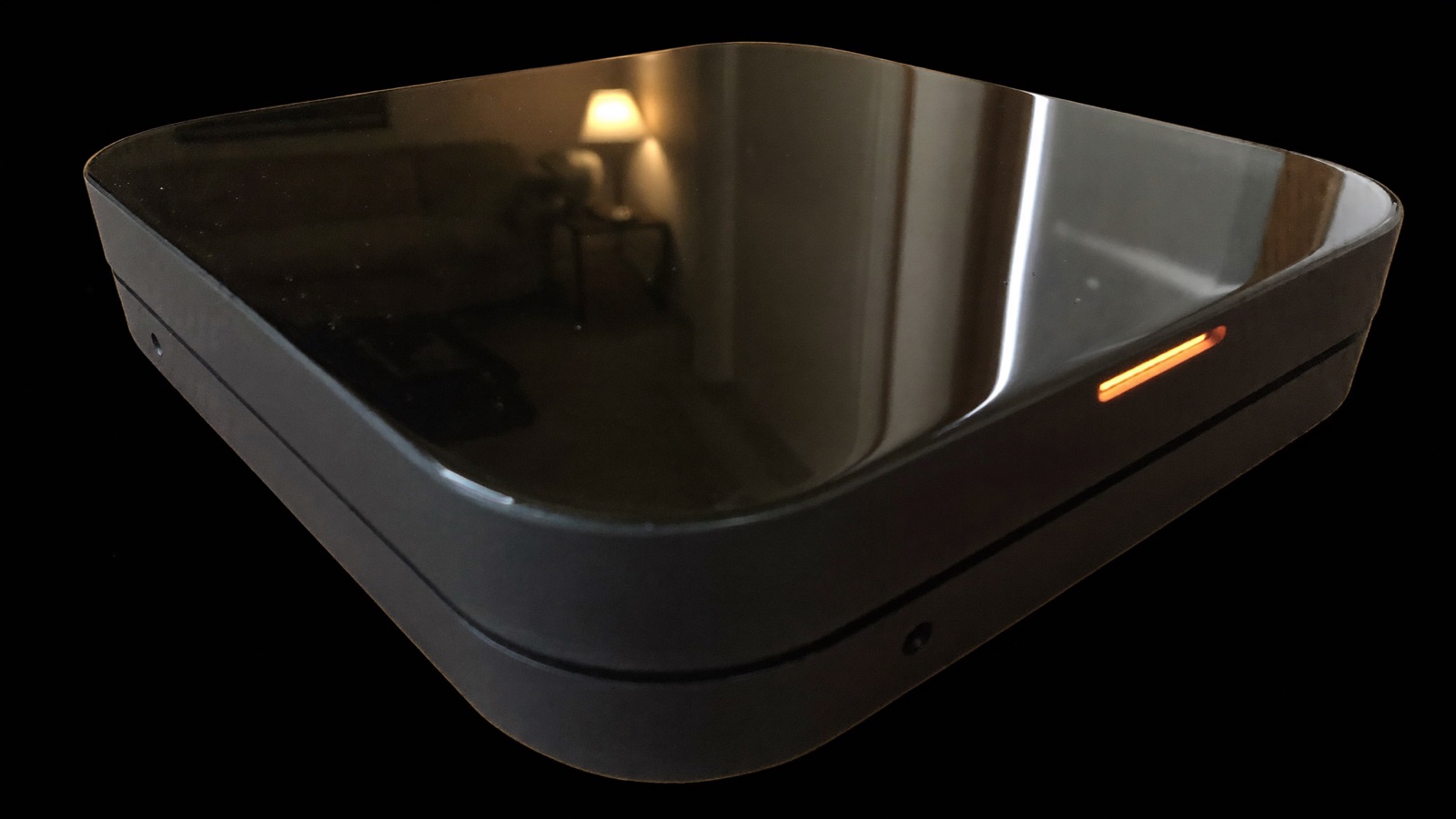
112 mm square, 24 mm tall. Matte body, a single sheet of glossy black glass on top. One amber light, on when it is blocking. It sits next to the TV and you forget it is there.
-
The glass
The top is the whole point.
They say they own the glass. This one is yours. Under it sits a light pipe carrying the only status light on the device, so there is no logo, no screen, and nothing blinking at you in a dark room.
-
Inside
A small computer that only talks to TVs.
A single board, two Wi-Fi radios, two Ethernet ports and Bluetooth for setup. Your phones and laptops never touch it. It runs the blocklists built from the same data as the app.
-
Setup
Two radios and a Bluetooth handshake.
Hold your phone near it and the app hands over your Wi-Fi details over Bluetooth, the way a speaker is set up. It joins your network on one radio and runs the TV network on the other. Ethernet is there if you want it, and USB-C for power. Nothing else.
It sits in the middle
Everything your TVs send goes through the Box first. That is the whole trick. Nothing else in the house changes.
A toggle is a promise. A blocked request is a fact.
Once a month the Box tells you how many times each set tried to phone home, and that it did not get through.
- Counts every blocked request, per device, per month.
- Tells you when a firmware update switches tracking back on.
- Runs a canary test: plays a pattern, watches the set try to upload, blocks it, watches it stop.
Glassback
Monthly receipt September
Network Living room box
Fingerprint attempts blocked
41,206
-
Living room41,206
LG C series OLED · LG webOS · BLOCKED
-
Bedroom12,880
TCL Roku TV · Roku OS · BLOCKED
-
Kitchen0
Apple TV 4K · Apple tvOS · NOTHING TO BLOCK
Kept trying to reach alphonso.tv, lgsmartad.com, lgad.cjpowercast.com. Streaming apps untouched.
A toggle is a promise. A blocked request is a fact.
The object
Designed to disappear next to a television. No screen, no logo, nothing blinking at you in a dark room.
- Size
- 112 x 112 x 24 mm. Smaller than a coaster.
- Top
- 3 mm glossy black glass, inset in a matte frame.
- Light
- One amber LED through the glass. On means blocking.
- Setup
- Bluetooth, from the app. Hand it your Wi-Fi once.
- Uplink
- Joins your existing Wi-Fi. Ethernet optional.
- Its network
- A second Wi-Fi that only TVs and streamers join.
- Ports
- 2 x Gigabit Ethernet, USB-C power, reset pin.
- Covers
- Every TV in the house, not one at a time.
- Account
- None. No login, no cloud, no subscription.
- Data
- Counts stay on the Box. The report is generated on it.
Get one in the first run
We are building a limited first batch and the list decides how big it is. Joining is free, takes an email address, and is not an order.
No payment is taken and no date is promised. You will hear from us when there is something real to see, and never more than that.
Questions
- Do I have to replace my router, or plug anything into it?
- No, and no. Setup is the same as an Echo or a Sonos: you hold your phone near the Box, the app hands it your Wi-Fi name and password over Bluetooth, and it joins your network like any other device. From there it creates a second Wi-Fi network of its own, and you join your TVs to that one. Your phones and laptops stay exactly where they are.
- I live in a building where I only get a Wi-Fi password.
- That is the case it was designed around. You never need the building's router, an Ethernet port behind the TV, or anyone's permission. You need your own Wi-Fi password, which you already have, and the ability to join your TV to a different network, which takes about a minute on the TV's own settings screen.
- Will my streaming apps still work?
- Yes. The Box blocks the fingerprinting and ad servers, which are different machines from the ones that send you video. Netflix, YouTube, Disney, live TV, game consoles and HDMI inputs are untouched.
- Does putting the TV on the Box slow down streaming?
- Not in a way you will see. The Box has two radios, so it talks to your Wi-Fi and to your TVs at the same time on different channels. A 4K stream needs about 25 Mbps and the link carries several times that. If you would rather not share the air at all, there is an Ethernet port on the back.
- Why not just flip the setting?
- Flip it. It is free, the app shows you where it is, and for most people that is enough. The Box is for the part the setting does not cover: it keeps working after firmware updates, it covers devices with no setting at all, and it can show you the traffic it stopped instead of asking you to trust a menu.
- When can I get one, and what will it cost?
- No date and no price yet. The list decides how many we build in the first run, and everyone on it hears first. Joining costs nothing and is not an order.